Choosing the Right QuickBooks Online Plan in 2026: A Practical Guide for Small Businesses
A clear comparison of QuickBooks Online Simple Start, Essentials, Plus, and Advanced, including pricing, key features, and what each plan is best suited for.
SMALL BUSINESSQUICKBOOKS
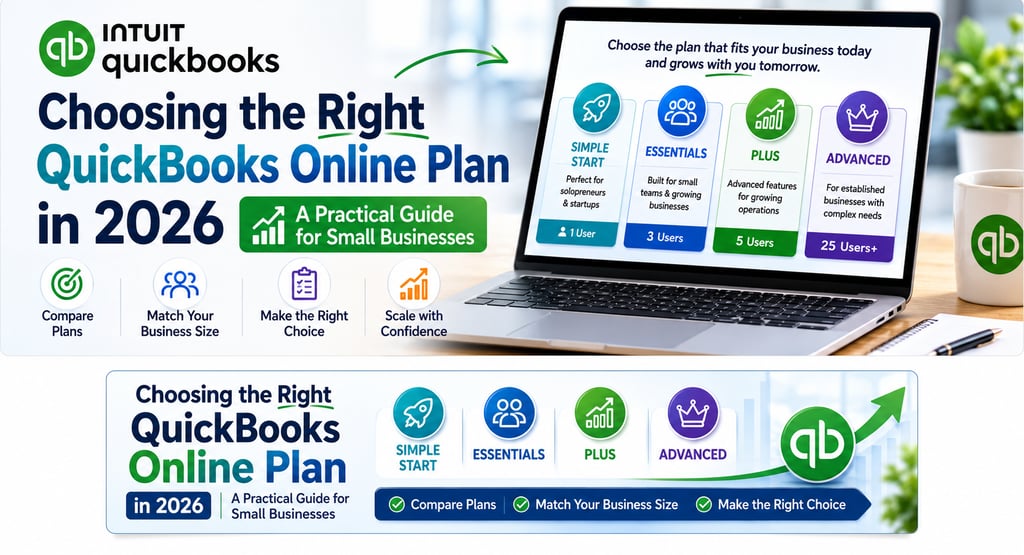
Choosing a QuickBooks Online plan can feel more confusing than it should be.
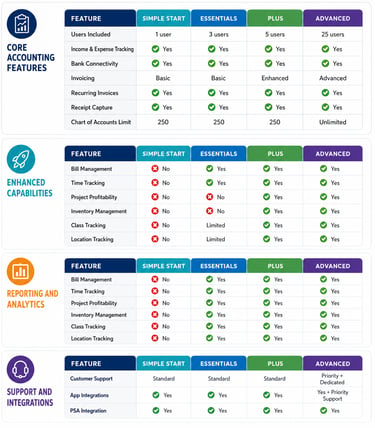
At first glance, the plans may look similar. But once you begin comparing users, billing tools, inventory features, reporting options, and automation, the differences start to matter.
For small business owners, the goal is not to choose the most advanced plan available. It is to choose the one that fits the way your business operates today while still giving you room to grow.
This guide walks through the four main QuickBooks Online plans and highlights what each one is generally best suited for.
QuickBooks Online Plans at a Glance
QuickBooks Online currently offers four main plan levels:
Simple Start
Essentials
Plus
Advanced
Each plan builds on the one before it, adding more features, more user access, and more flexibility.
In general:
Simple Start works best for very small businesses with basic bookkeeping needs
Essentials adds helpful tools for collaboration and bill management
Plus is often a better fit for growing businesses that need stronger tracking and reporting
Advanced is designed for more complex businesses that need added permissions, automation, and deeper reporting
A note on pricing
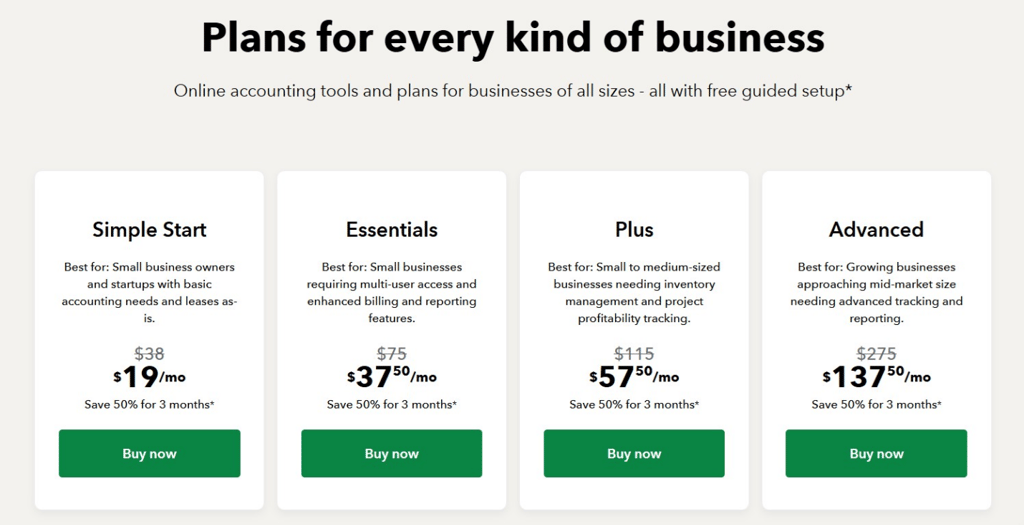
QuickBooks pricing can change over time, and promotional rates are often different from standard monthly pricing.
That is why it helps to look at both:
the current promotional price
the regular ongoing price
the features included at each level
The lowest monthly price is not always the best long-term value if the plan does not support your workflow or if you may need to upgrade again soon.
What each plan is generally best for
Simple Start
Simple Start is usually a good option for:
solopreneurs
freelancers
very small businesses
businesses with simple invoicing and expense tracking needs
It covers the basics well, but it can feel limited if you need more than one user or more involved workflow tools.
Essentials
Essentials may be a better fit if you:
need multiple users
want bill management features
need time tracking
are starting to outgrow a basic setup
For many small businesses, this is the point where QuickBooks becomes more practical for day-to-day operations.
Plus
Plus is often worth considering for businesses that:
want project profitability tools
need inventory tracking
want stronger reporting visibility
are growing beyond basic bookkeeping needs
This plan tends to work well for service-based and product-based businesses that need more operational visibility.
Advanced
Advanced is typically best for businesses that:
have more complex operations
need more users and permissions
want workflow automation
rely on more customized reporting
It may not be necessary for every small business, but it can be a strong fit for established businesses with greater complexity.
Key feature differences to pay attention to
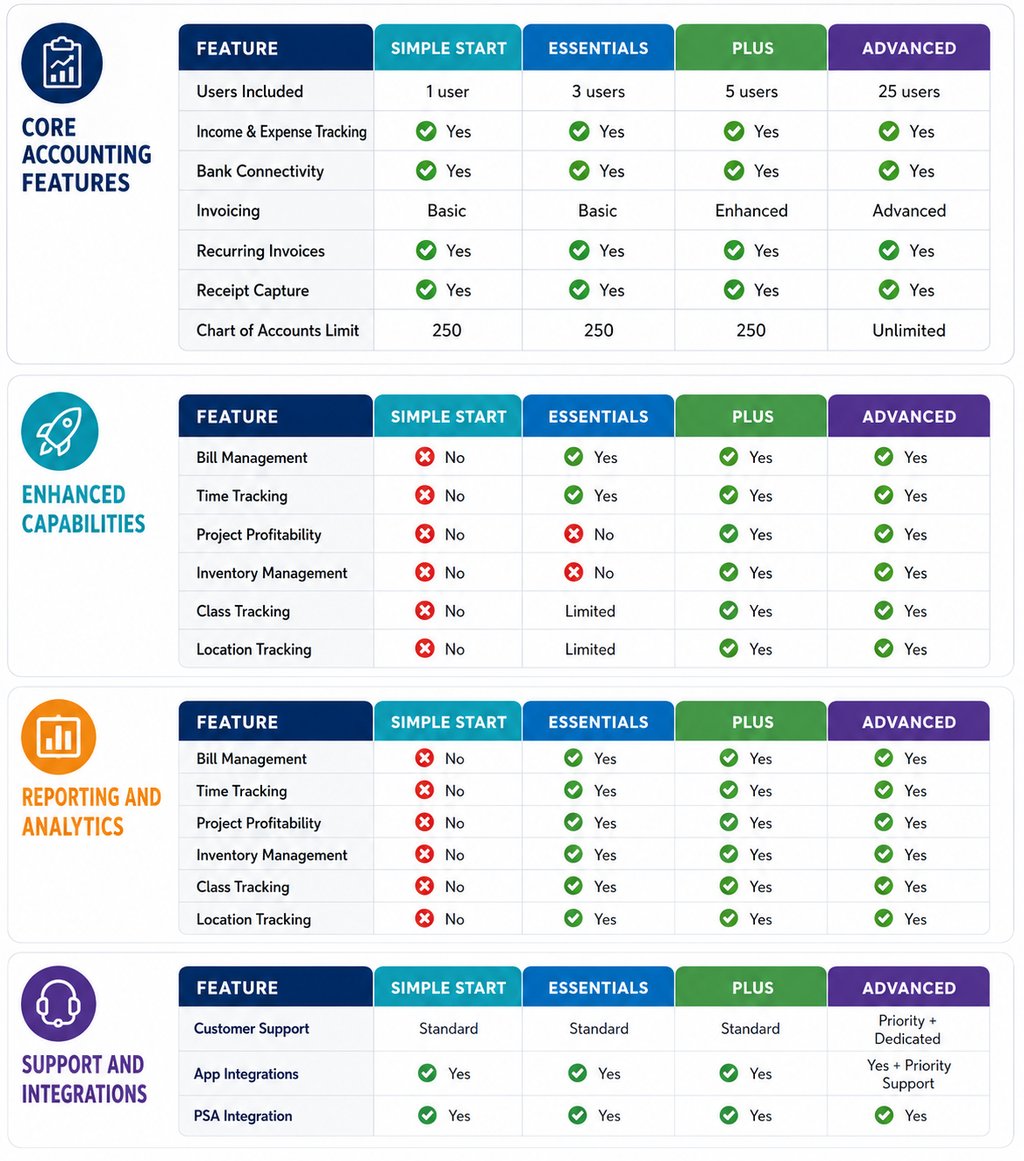
When comparing plans, these are some of the most important things to look at:
1. User access
If more than one person needs access to the books, plan limits matter quickly.
Think about whether your:
bookkeeper
office manager
partner
payroll contact
operations team
will need access now or in the near future.
2. Billing and payables workflow
If your business regularly sends invoices, tracks unpaid balances, or manages vendor bills, those tools can make a meaningful difference.
A plan that supports your actual workflow usually matters more than choosing the lowest price.
3. Inventory and project tracking
Not every business needs these tools, but if you do, choosing a plan that doesn't include them can create unnecessary friction.
This is often where businesses realize they have outgrown a lower-tier plan.
4. Reporting and visibility
As a business grows, clearer reporting becomes more important.
It helps to ask:
Do I just need basic reports?
Do I want job or project visibility?
Do I need more customized reporting?
Will multiple people need to review the numbers?
Who should choose which plan?
There is no single “best” QuickBooks plan for every business. The better question is:
Which plan fits your current needs without creating unnecessary limitations too soon?
As a general guide:
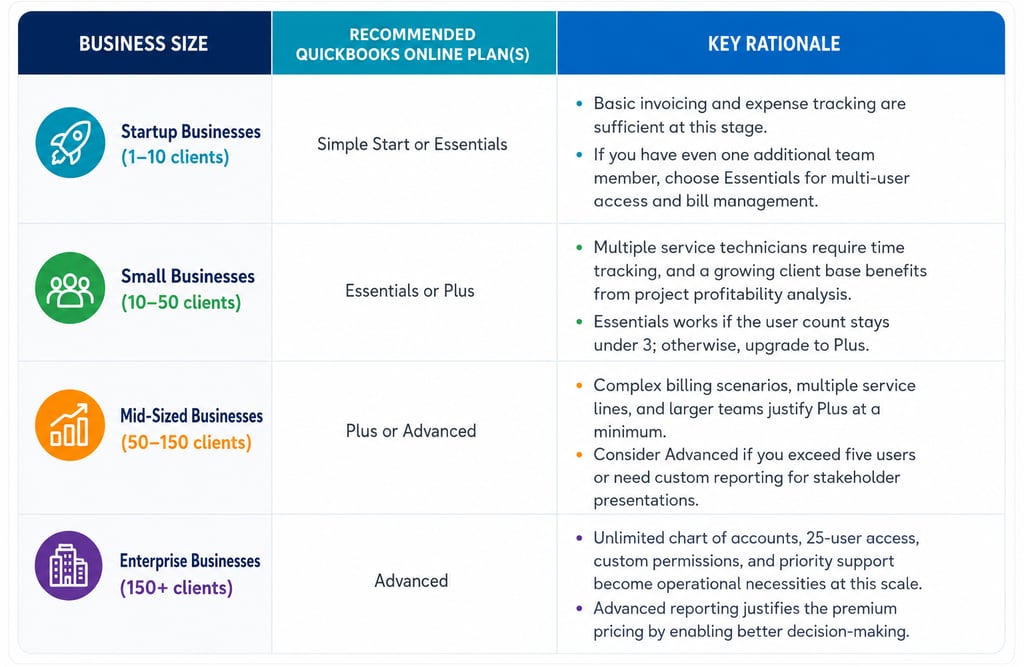
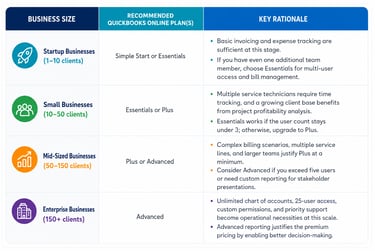
Startup businesses may do well with Simple Start or Essentials
Small businesses with regular activity may be better suited for Essentials or Plus
Mid-sized or growing businesses may need Plus or Advanced
More complex businesses are usually more likely to need Advanced
One practical rule: if you already know your business is growing, it may make sense to choose the plan that supports the next stage of your workflow—not just today’s minimum requirements.
That does not always mean upgrading beyond what is necessary. It simply means thinking ahead so you are not forced into a change too quickly.
How to pick the best QuickBooks Online plan for your business
A simple way to decide is to walk through these four questions.
1. How many people need access?
If only one person will be working in the books, a lower-tier plan may be enough.
If multiple team members need access, user limits become more important right away.
2. What does your business actually need to do each week?
Look at your real workflow, not just the feature list.
For example:
Do you track bill payments?
Do you need time tracking?
Do you manage inventory?
Do you want job or project reporting?
Do you need stronger month-to-month reporting?
The right plan should support how your business operates in real life.
3. What will the business likely need in the next 12 to 24 months?
If growth is likely, it is worth thinking ahead.
Changing plans later is possible, but choosing a plan that gives you a little room can make things go more smoothly as your business expands.
4. What is the full value—not just the monthly price?
Monthly cost matters, but so does efficiency.
If a higher plan helps save time, reduce workarounds, improve reporting, or support better workflows, it may provide better overall value.
That does not mean higher is always better. It just means the lowest price is not the only thing worth comparing.
Final thoughts
QuickBooks Online can be a strong tool for small businesses, but the right plan depends on how your business operates.
The best choice is usually the one that:
supports your current workflow
gives you the reporting you need
fits your team size
leaves reasonable room for growth
If you are unsure which plan makes sense, it often helps to step back and look at the business's actual day-to-day needs rather than comparing features in isolation.
If you’d like help deciding which QuickBooks Online plan makes the most sense for your business, I’d be happy to talk it through with you.