QuickBooks Online vs Excel: Which Should a Small Business Use?
A practical comparison of Excel and QuickBooks Online for small businesses, including cost, time, reporting, and which option tends to work best at different stages of growth.
QUICKBOOKSSMALL BUSINESS
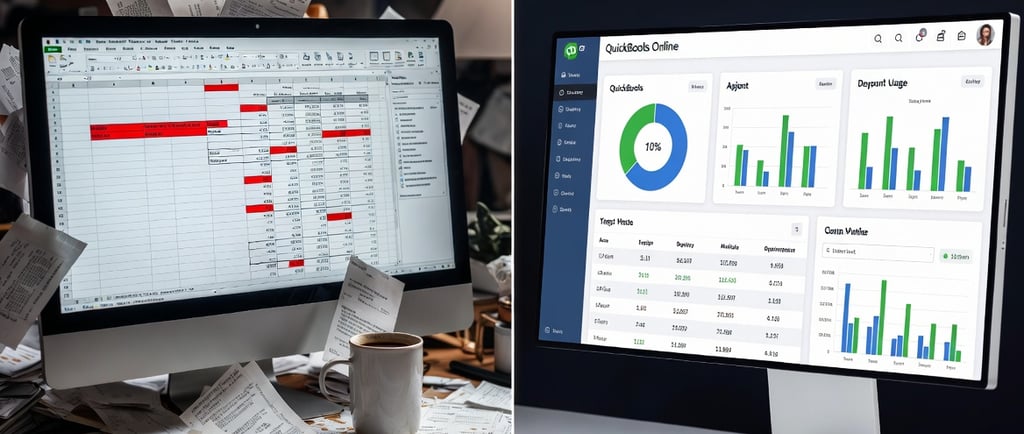
QuickBooks Online vs Excel: Which Should a Small Business Use?
If you run a small business, it’s common to wonder whether you really need bookkeeping software—or whether Excel is enough.
For some businesses, Excel can work for a while. For others, QuickBooks Online becomes the more practical option fairly quickly.
The better question is not which tool is “best” in general. It’s which one fits your business based on:
how much activity you have
how much time you want to spend bookkeeping
how important automation and reporting are
whether your business is growing
This guide looks at both options in a practical, balanced way.
A simple answer first
If your business is brand new, has very few transactions, and you are comfortable staying organized manually, Excel may be enough for a while.
If your business is growing, has regular income and expenses, or needs clearer reporting, QuickBooks Online is often the more efficient long-term choice.
That does not mean every business needs to switch immediately. It just means the right tool depends on your current stage and workflow.
Quick comparison: Excel vs QuickBooks Online
Here are some of the biggest differences small business owners usually care about:
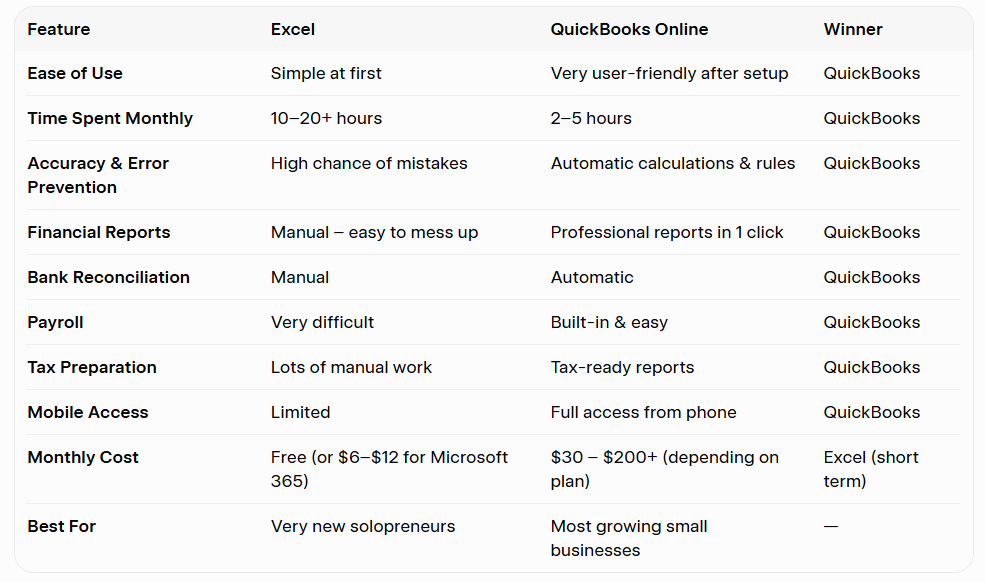
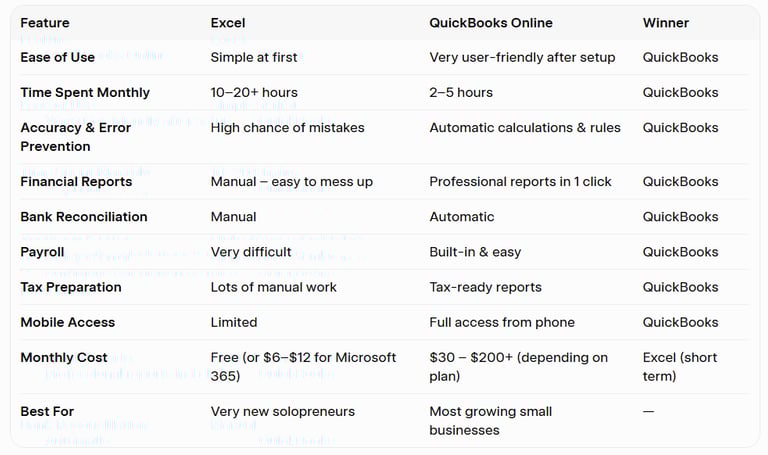
In general:
Excel tends to win on low cost and flexibility
QuickBooks Online tends to win on automation, reporting, reconciliation, and efficiency
The more your business grows, the more those differences usually matter.
Where Excel works well
Excel can still be a reasonable option in some situations.
Excel may work well if:
you are a brand-new solopreneur
you have very low transaction volume
you do not have employees
you are comfortable entering and organizing everything manually
you only need a simple system for tracking basic income and expenses
Why some business owners start with Excel
it is low cost or already included with Microsoft 365
many people already know how to use it
it allows for custom tracking
it can feel simpler at the very beginning
For a very small business, those are legitimate advantages.
Where Excel starts to become difficult
Excel usually becomes harder to manage as a business grows.
Common challenges with Excel
manual data entry takes time
formulas can break or be changed accidentally
reports have to be built manually
reconciliations are more time-consuming
collaboration with a bookkeeper or tax preparer is less streamlined
it becomes harder to spot missing or miscategorized transactions
Why this matters
The issue is usually not that Excel is “bad.” It depends heavily on manual consistency. As the business grows, that becomes harder to maintain.
Where QuickBooks Online tends to help
QuickBooks Online is designed specifically for bookkeeping, which makes certain tasks much easier.
QuickBooks Online is often helpful for:
linking bank and credit card accounts
categorizing transactions more efficiently
reconciling accounts
generating Profit & Loss and Balance Sheet reports
tracking invoices and payments
managing payroll integrations
sharing access with a bookkeeper or accountant
Why many small businesses move to software
Once the books need to be updated regularly, reviewed monthly, or shared with another person, software often saves time and reduces manual work.
A more balanced look at the tradeoffs
Both tools have strengths and limitations.
Excel: Pros
low cost
flexible
familiar to many users
can work for simple businesses at a very early stage
Excel: Cons
manual and time-consuming
easier to make formula or data-entry errors
harder to scale
limited automation
more effort is required to create useful reports
QuickBooks Online: Pros
built specifically for bookkeeping
saves time on recurring tasks
easier bank reconciliation
clearer built-in financial reports
easier to collaborate with a bookkeeper or tax preparer
better suited for growing businesses
QuickBooks Online: Cons
monthly subscription cost
some setup required
a small learning curve at the beginning
What matters most when deciding
Instead of asking, “Which one is better?” it helps to ask a few more specific questions.
1. How many transactions do you have each month?
If the business has fewer than 50 transactions and stays very simple, Excel may still be manageable.
If transactions are growing steadily, bookkeeping software often becomes worth it.
2. Do you need reliable reports?
If you want to regularly review:
Profit & Loss
spending trends
cash flow
unpaid invoices
year-end tax-ready numbers
QuickBooks Online usually makes that easier.
3. How much time are you spending on bookkeeping?
If bookkeeping is taking several hours each month and still feels hard to keep up with, your system may be too manual for your current stage.
Time matters too—not just subscription cost.
4. Will someone else need access?
If your bookkeeper, tax preparer, office manager, or business partner needs access, QuickBooks Online is often much easier to share and manage than spreadsheets.
5. Is the business likely to grow soon?
If you expect:
more customers
more transactions
payroll
contractors
inventory
more complex reporting
it may make sense to choose a system that can support that growth rather than waiting until things feel messy.
A practical rule of thumb
Excel may be enough if:
you are in the very early stages
your bookkeeping is extremely simple
you do not need payroll
you are comfortable staying organized manually
QuickBooks Online may be worth considering if:
you are making regular sales
business expenses are increasing
you need cleaner reports
you want to save time
you are preparing for growth
you want an easier system to maintain month after month
That does not mean every small business must use QuickBooks. It just means there is often a point where bookkeeping software becomes the more practical tool.
My recommendation for small businesses
A balanced recommendation would be:
Start with Excel only if your business is still very small and simple
Move to QuickBooks Online once the manual work starts taking too much time or limiting visibility
That approach helps avoid overcomplicating things too early, while also avoiding the problems that come from outgrowing a spreadsheet.
Final thoughts
Excel and QuickBooks Online both have a place.
For a very new business, Excel can be a perfectly reasonable starting point. But as bookkeeping needs become more regular, more detailed, or more time-sensitive, QuickBooks Online often becomes the stronger long-term option.
The right choice depends on how your business operates today—and whether your current system is helping you stay organized, accurate, and informed.
Not sure which system fits your business best?
If you’d like help thinking through your current setup, I’d be happy to talk it through with you and help you decide what makes the most sense for your business stage.