QuickBooks Online vs Excel: Which Should a Small Business Use?
Compare QuickBooks Online and Excel for small-business bookkeeping, including cost, automation, reporting, controls, and when Excel still makes sense.

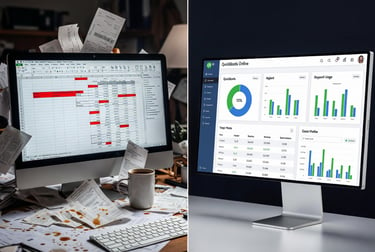
Excel is familiar, flexible, and already available to many business owners. A carefully built spreadsheet can total income and expenses, create a budget, and organize information for an accountant. That makes it tempting to treat Excel as a complete accounting system - especially when a business is new and every subscription feels optional.
The real question is not whether Excel can hold financial information. It can. The question is whether the business needs the structure, controls, reconciliation tools, linked records, and repeatable reporting that accounting software provides. For most operating small businesses, that need arrives sooner than the owner expects.
THE SHORT ANSWER
For most active small businesses, QuickBooks Online should be the accounting system of record. Excel remains extremely useful for budgets, forecasts, schedules, and custom analysis, but it is usually a weak substitute for a reconciled general ledger. A spreadsheet may be reasonable for a pre-revenue or extremely low-activity business, provided the records are complete, reviewed consistently, and moved into accounting software before complexity increases.
QuickBooks Online and Excel solve different problems
QuickBooks Online is designed to maintain a business's accounting records. It organizes transactions within a chart of accounts, supports double-entry bookkeeping, connects related records, reconciles balance-sheet accounts, and produces standard financial statements from the ledger.
Excel is a general-purpose spreadsheet. It is excellent at calculations, schedules, models, comparisons, and customized analysis. Microsoft 365 versions also support cloud sharing, co-authoring, worksheet protection, change review, and version history. Those features make Excel a valuable business tool, but they do not automatically create an accounting system.
A useful way to frame the choice is this: QuickBooks should usually preserve the official accounting record; Excel should help the owner explore, explain, forecast, or present information drawn from that record.
What QuickBooks Online provides
QuickBooks Online places common bookkeeping tasks inside one connected workflow. Income and expense transactions affect account balances. Customer invoices flow to accounts receivable. Vendor bills flow to accounts payable. Bank and credit-card activity can be matched to recorded transactions. Reconciliations test whether the books agree with outside statements.
Its main advantages for a growing small business include:
A structured chart of accounts and double-entry general ledger.
Bank and credit-card connections that reduce repetitive entry and support matching.
Built-in reconciliation tools for bank, credit-card, loan, and other balance-sheet accounts.
Customer, vendor, invoice, bill, payment, and deposit records that remain connected.
Profit-and-loss, balance-sheet, cash-flow, receivable, payable, and management reports.
An audit log that records account activity and transaction changes.
User roles and separate accountant access instead of shared passwords or duplicated files.
Connections to payroll, payments, point-of-sale systems, expense tools, and other applications.
QuickBooks does not make bookkeeping automatic or error-proof. Bank-feed suggestions can be accepted incorrectly, duplicate transactions can be created, and poorly designed workflows can still produce unreliable reports. The advantage is that the software supplies an accounting framework in which the work can be reviewed and reconciled.
What Excel does well
Excel is stronger than QuickBooks for many forms of flexible analysis. A business can build a rolling cash forecast, compare pricing options, model hiring decisions, prepare a loan schedule, analyze margins, track key performance indicators, or create a custom management dashboard without being limited to an accounting program's report structure.
Excel is especially useful for:
Budgets, forecasts, and what-if scenarios.
Cash-flow projections and short-term planning.
Pricing, margin, break-even, and capacity analysis.
Custom schedules for loans, fixed assets, prepaid expenses, or other supporting detail.
Cleaning, sorting, comparing, or mapping data before importing it into another system.
KPI dashboards and owner-friendly summaries built from finalized accounting data.
Modern collaboration features also make a cloud-stored workbook safer than emailing different copies back and forth. But Excel's flexibility is also its weakness: cells can be overwritten, formulas can break, rows can be omitted from ranges, and a workbook can continue displaying plausible totals even when its logic is wrong.


QuickBooks Online vs. Excel at a glance
The hidden cost of spreadsheet bookkeeping
Excel may look less expensive because the owner already has Microsoft 365 or can use Excel for the web. Subscription price, however, is only one part of the cost. A workbook-based process can require repeated downloading, copying, categorizing, checking formulas, rolling schedules forward, and rebuilding reports. Time spent maintaining the workbook is a real business cost.
The larger risk appears when the workbook must be cleaned up for a tax professional, lender, buyer, or bookkeeper. Missing transactions, unreconciled balances, duplicated deposits, broken formulas, and inconsistent categories can turn several months of apparent savings into an expensive catch-up project.
QuickBooks can also become costly when a business pays for a plan it does not need, adds unnecessary applications, or assumes bank feeds eliminate bookkeeping. The right comparison is therefore not subscription versus no subscription. It is the total cost of producing accurate, timely, reviewable records.
Can a small business legally use Excel for its records?
The IRS generally does not require a small business to use one specific recordkeeping system. A business may choose a system suited to its operations, but the records must clearly show income and expenses and provide a complete, accurate, accessible history of the underlying activity. Electronic records are held to the same basic requirements as paper records.
That means an Excel workbook is not automatically unacceptable - and a QuickBooks file is not automatically sufficient. Either one can fail when information is missing, unsupported, unreconciled, or inconsistent. The practical question is which system is most likely to remain complete and reliable as transaction volume and business complexity increase.
When Excel may be enough
A controlled spreadsheet may be reasonable for a limited period when nearly all of the following are true:
The business is pre-revenue or has very few transactions each month.
The business has one bank account and little or no credit-card activity.
There are no employees, payroll filings, inventory, sales-tax obligations, loans, or meaningful receivables and payables.
One person maintains the workbook, stores supporting documents, and protects formulas and structure.
The bank balance is reconciled, and the records are reviewed on a consistent schedule.
The owner has a clear plan to move to accounting software before the activity becomes too difficult to reconstruct.
Even in this situation, treat Excel as a controlled bookkeeping process rather than a casual list of deposits and purchases. A transaction list alone does not explain outstanding bills, unpaid invoices, loan principal, owner contributions, owner draws, sales tax, or other balance-sheet activity.
Signs your business has outgrown Excel
It is usually time to move into accounting software when:
Reconciling the bank or credit card takes more than a simple monthly review.
The business sends invoices, tracks customer balances, enters bills, or needs to know what is due.
Payroll, sales tax, inventory, loans, equipment, or multiple owners enter the picture.
Transactions arrive through several payment processors, sales channels, or business locations.
A lender, tax professional, partner, or manager needs dependable financial statements.
More than one person works in the records, and access needs to be controlled.
The workbook has multiple versions, unexplained adjustments, broken formulas, or totals that no one can reproduce.
Bookkeeping is postponed because updating the spreadsheet has become too time-consuming.
Which QuickBooks Online plan should a small business consider?
The least expensive plan is not always the lowest-cost choice. At the time this article was prepared, QuickBooks Online's U.S. plan limits included one billable user for Simple Start, three for Essentials, five for Plus, and twenty-five for Advanced. Class and location tracking was unavailable in Simple Start and Essentials, available with a combined limit in Plus, and unlimited in Advanced.
A solo service business with straightforward income and expenses may be well served by Simple Start. A business that needs additional users, recurring transactions, more robust bill workflows, inventory, projects, or class and location reporting may require a higher plan. Because Intuit changes features, limits, packaging, and pricing, confirm the current plan comparison before subscribing.
Don't choose a plan based only on today's transactions. Consider who needs access, how revenue is earned, what the business must track separately, which applications must connect, and what reports management will need during the next year.
A note for restaurant owners
Excel belongs in a restaurant's toolkit - but not at the center of the ledger.
Restaurants can use spreadsheets effectively for recipe costing, budgets, schedules, menu analysis, and other operational work. But daily POS sales, merchant deposits, cash, delivery settlements, tips, payroll, vendor activity, sales tax, gift cards, and inventory create too many connected accounting issues for Excel to serve comfortably as the primary books. A restaurant-specific platform such as MarginEdge can add invoice, food-cost, inventory, and recipe information while QuickBooks maintains the accounting ledger.
Has your business outgrown spreadsheet bookkeeping?
TrueCount Services can help you review your current records, choose the right QuickBooks Online plan, and identify what to clean up before the transition.
Intuit, QuickBooks, and QuickBooks ProAdvisor are registered trademarks of Intuit Inc. used with permission under the QuickBooks ProAdvisor Agreement.