
Third-party delivery services can help a restaurant reach new customers, increase order volume, and offer delivery without hiring and managing its own drivers. They can also introduce substantial commissions, confusing deposits, additional operational pressure, and financial reporting that does not always match what appears in the point-of-sale system.
The better question is not simply, “Will delivery increase sales?” It is: Will these orders produce enough profit to justify the fees and additional workload?
This guide compares DoorDash, Uber Eats, and Grubhub, including their current pricing structures, setup processes, system integrations, payment schedules, reporting requirements, and financial implications.
Pricing and features referenced below were reviewed in July 2026. Rates may vary by location, negotiated agreement, order type, and applicable local regulations. Always review the restaurant’s actual contract before enrolling.
Quick Comparison of the Major Platforms
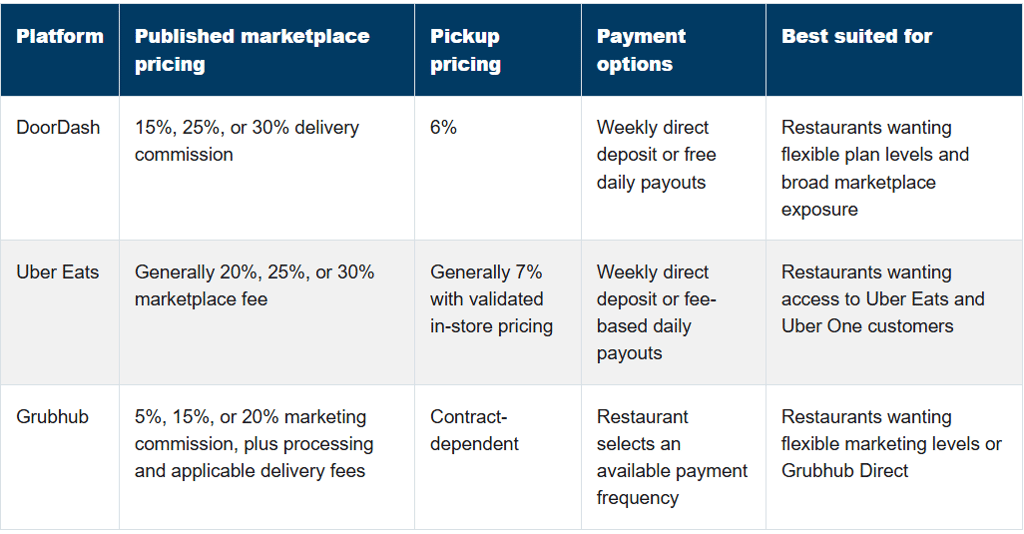
DoorDash currently publishes delivery commissions of 15% for Basic, 25% for Plus, and 30% for Premier, with a 6% pickup commission across the three plans. DoorDash merchant pricing
Uber Eats publishes marketplace fees of 20% for Lite, 25% for Plus, and 30% for Premium, although lower Lite rates may be available in select cities. Pickup is generally 7% when the restaurant validates that its pickup pricing matches its in-store pricing; otherwise, a higher rate may apply. Uber Eats pricing
Grubhub’s published marketing commissions are 5% for Basic, 15% for Plus, and 20% for All-Access. If the restaurant uses Grubhub’s drivers, delivery fees currently start at 10%. Order-processing and other applicable fees are separate. Grubhub pricing and fees
How Third-Party Delivery Services Work
A third-party delivery platform may provide three separate services:
Marketplace exposure: Customers discover the restaurant through the delivery app.
Ordering and payment processing: The platform accepts the order and collects the customer’s payment.
Delivery fulfillment: A driver affiliated with the platform picks up and delivers the order.
Restaurants do not always need all three services. For example, a restaurant may use DoorDash Marketplace to attract new customers while also using DoorDash Drive On-Demand to deliver orders placed directly through the restaurant’s website.
That distinction matters because marketplace orders generally carry percentage-based commissions, while direct-delivery services may charge a flat fee per delivery.
Looking for a specific platform?
Jump directly to the platform you’re considering for a closer look at its advantages, disadvantages, setup process, integrations, financial reporting, and payment structure.
Advantages of DoorDash
Three commission plans let restaurants choose between lower costs and greater marketplace exposure.
Restaurants can receive weekly deposits or opt into daily payouts at no additional charge.
DoorDash integrates with many popular restaurant POS systems.
Restaurants can use DoorDash Marketplace, direct online ordering, or Drive On-Demand for delivery fulfillment.
The Merchant Portal offers financial, sales, marketing, operations, and product-mix reporting.
DoorDash handles driver recruitment, dispatching, tracking, payment processing, and much of the customer-facing delivery support.
Disadvantages of DoorDash
Delivery commissions can consume 15% to 30% of the food-and-beverage sale before food, packaging, and labor costs are considered.
Promotions, sponsored listings, refunds, adjustments, and error charges can further reduce the payout.
Restaurants may become dependent on the platform for customer discovery.
A restaurant using a separate tablet must manually enter orders into its POS unless an integration is established.
Deposits represent net payouts—not gross sales—so additional bookkeeping is required.
Higher order volume can strain the kitchen during peak dine-in periods.
How to Set Up DoorDash
Before beginning, gather:
Legal business and ownership information
Business license and tax identification number
Bank account information for direct deposit
Restaurant address, telephone number, and operating hours
Menu descriptions, modifiers, prices, and photographs
Pickup instructions and estimated preparation times
The restaurant then selects a pricing plan, establishes its menu, chooses how orders will be received, and connects its bank account. DoorDash says onboarding can move quickly, although timing depends on menu complexity, the order-management method, and integration requirements. DoorDash delivery setup guide
Before going live, the restaurant should place a test order and confirm:
Items and modifiers reach the kitchen correctly.
Prices match the intended delivery menu.
Sales tax is handled correctly.
Tickets print at the correct station.
Preparation times are realistic.
Sold-out items can be disabled quickly.
Employees know how to handle pickups, substitutions, and cancellations.
How DoorDash Integrates With the Restaurant’s Systems
A restaurant generally has three options.
DoorDash tablet: Orders arrive on a separate tablet. An employee accepts the order and manually enters it into the POS. This is the easiest initial setup, but it creates more opportunity for missed orders, duplicate entry, pricing differences, and reporting discrepancies.
Direct POS integration: DoorDash can integrate with systems such as Toast, Square, Revel, and other supported platforms. Orders can flow directly into the POS and then to the kitchen printer or kitchen display system. Menu and availability syncing may also be supported. DoorDash POS integrations
Middleware integration: Restaurants using multiple delivery services may use an aggregator such as Deliverect, Otter, Chowly, or Checkmate. The middleware receives orders from several platforms and sends them into the POS through one connection.
A POS integration does not necessarily mean DoorDash deposits automatically reconcile in QuickBooks Online. The POS records the sale, but the platform’s payout report is still needed to separate commissions, promotions, taxes, refunds, and the net deposit.
DoorDash Financial Reporting
DoorDash’s financial reports include:
Gross order sales
DoorDash commissions and fees
Marketing expenses
Promotions
Error charges and adjustments
Canceled or refunded orders
Payout IDs and dates
Net payout amounts
Order-level transaction details
Monthly statements are generally available by the fifth day of the following month. DoorDash also offers sales, operations, marketing, and product-mix reports. DoorDash payout and statement guide, DoorDash reporting guide
How DoorDash Pays the Restaurant
The customer pays DoorDash. DoorDash then deducts applicable commissions, promotions, marketing expenses, refunds, and adjustments before depositing the remaining amount into the restaurant’s bank account.
Restaurants may choose weekly direct deposits or enroll in daily payouts at no charge. DoorDash merchant FAQ
The bank deposit should be matched to the corresponding DoorDash payout—not simply categorized as restaurant sales.


Advantages of Uber Eats
Access to customers already using Uber and Uber Eats.
Multiple plan levels based on the restaurant’s desired visibility and fee tolerance.
Uber handles delivery logistics, payment processing, tracking, and customer support.
Restaurants can integrate orders with supported POS systems.
Self-delivery and Uber Direct provide alternatives to the standard marketplace model.
Uber Eats Manager provides detailed sales, tax, fee, and payout reports.
Plus and Premium plans can provide additional visibility to Uber One members.
Disadvantages of Uber Eats
Standard marketplace fees can range from approximately 20% to 30%.
Customer delivery fees are dynamic, which may affect order conversion without being controlled by the restaurant.
Promotions and advertising can increase the true cost of acquiring an order.
Daily payouts carry an additional fee.
The restaurant has limited ownership of the customer relationship compared with orders placed directly.
Refunds and order adjustments may appear after the original sale date.
Uber One participation can carry additional fee terms depending on the plan and restaurant agreement.
How to Set Up Uber Eats
The restaurant begins by creating a merchant account and providing:
Legal and tax information
Bank account details
Restaurant location and hours
Menu items, prices, modifiers, and photos
Preparation times
Delivery and pickup availability
The desired marketplace plan
The preferred order-management method
The restaurant should decide whether to use:
An Uber Eats tablet
A direct POS connection
A third-party middleware provider
Self-delivery
Uber Direct for orders originating outside the marketplace
Before activation, conduct test orders for delivery, pickup, refunds, modifiers, taxes, and kitchen routing.
How Uber Eats Integrates With the Restaurant’s Systems
Uber Eats works with various POS and technology providers. Depending on the system, self-enrollment may be available from the POS provider’s dashboard. Activation timing, capabilities, and partner charges vary by provider. Uber Eats POS integration guide
With an effective integration:
Orders flow into the POS.
Tickets reach the appropriate printer or KDS.
Menu changes may sync between systems.
Store hours and item availability can be managed more consistently.
Employees avoid manually re-entering orders.
The restaurant must still compare Uber’s financial reports with the POS. The POS may record a $100 sale while Uber deposits only $70 or $75 after fees. Both numbers can be correct because they represent different parts of the same transaction.
Uber Eats Financial Reporting
Uber Eats Manager allows restaurants to download:
Daily Summary reports
Weekly Summary reports
Payment Details reports
Payout Summary reports
Order-level sales and adjustment details
Tax information
Uber service and marketplace fees
Promotions and marketing charges
Net payout totals
The Payment Details report provides the most useful order-level information for bookkeeping and reconciliation. Uber Eats payment statements
How Uber Eats Pays the Restaurant
Uber’s weekly remittance period generally runs from Monday through the following Monday. Deposits initiate on Monday and typically require another one or two business days to reach the restaurant’s bank. Uber Eats payment schedule
Restaurants may opt into daily payouts through Uber Eats Manager. Uber currently publishes a daily-payment fee of $1 per location per day, and bank settlement may still take additional time. Uber Eats daily pay


Advantages of Grubhub
The Basic plan begins with a comparatively low 5% marketing commission.
Restaurants choose how much marketplace exposure they want.
Grubhub delivery can be added when the restaurant does not have its own drivers.
Grubhub Direct provides a branded online-ordering option with no marketing commission.
The platform offers self-activation and test-order functionality.
Multi-location operators can choose consolidated or location-specific deposits.
Financial statements clearly separate marketing, delivery, processing, promotions, and adjustments.
Disadvantages of Grubhub
The published marketing commission is not the restaurant’s complete cost.
Delivery charges, order-processing fees, promotions, and other adjustments may be added to the marketing commission.
A restaurant paying a 20% marketing commission and a delivery fee starting at 10% could face a substantial effective fee before processing or promotions.
Restaurants must understand whether they or Grubhub are providing the driver.
Separate tablets create manual-entry and reconciliation challenges.
Each restaurant’s final package and rates can differ, making contract review especially important.
How to Set Up Grubhub
After signing up, the restaurant receives an activation email and creates an administrator account. Grubhub’s setup process includes:
Completing the W-9.
Connecting a bank account.
Selecting an available payment frequency.
Uploading storefront and menu photographs.
Confirming delivery and pickup hours.
Reviewing the menu.
Setting up the Grubhub tablet or POS integration.
Sending a test order.
Selecting an immediate or future go-live date.
Grubhub notes that its menu team may require two or three days to complete a menu. Grubhub self-activation guide
How Grubhub Integrates With the Restaurant’s Systems
Grubhub supports connections with various POS and middleware providers. The exact setup depends on the restaurant’s system.
For example:
Some Clover users can connect Grubhub through Clover’s Online Ordering settings.
Grubhub has integrations involving Toast, MICROS, Square, and other restaurant systems.
Deliverect can send Grubhub orders into the POS and use the Deliverect menu as the source for Grubhub menu updates.
Integration availability and functionality can differ by POS version and location. The restaurant should confirm whether the connection supports:
Order injection
Menu syncing
Modifiers
Pricing
Tax mapping
Tips
Cancellations and refunds
Store hours
Item availability
Multiple revenue centers or locations
Grubhub Financial Reporting
Grubhub provides a financial statement whenever the restaurant is paid. The statement can include:
Marketplace orders
Canceled orders
Prepaid orders
Order adjustments
Restaurant-funded promotions
Grubhub-funded promotion credits
Account adjustments
Marketing commissions
Delivery charges
Order-processing charges
Pay Me Now fees
Taxes included in the payment
The final amount deposited
Grubhub financial statement guide
How Grubhub Pays the Restaurant
Restaurants complete a W-9 and connect a bank account for direct deposit. Grubhub allows the restaurant to select from available payment frequencies.
Multi-location restaurants can choose:
One combined deposit covering multiple locations
A separate deposit for each location
The restaurant should choose the structure that makes reconciliation easiest. Separate deposits are often easier when every restaurant location has its own accounting file or bank account. Grubhub payment setup


The Most Important Accounting Rule: Record Gross Sales, Not Just Deposits
One of the most common third-party delivery bookkeeping mistakes is recording the bank deposit as revenue.
Consider this simplified order activity:
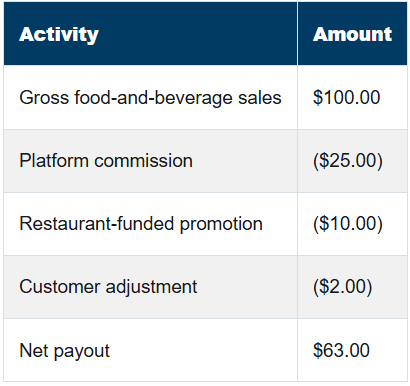
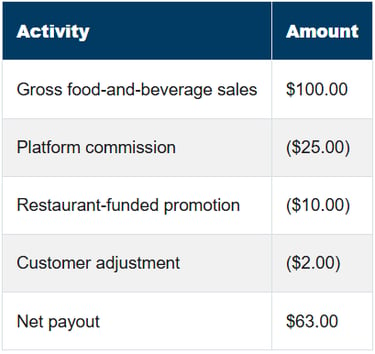
The restaurant earned $100 in gross sales and incurred $37 in platform-related expenses and reductions. Recording only the $63 deposit understates both revenue and expenses.
A better presentation would generally show:
Food-and-beverage sales: $100
Delivery-platform commissions: $25
Promotions or discounts: $10
Refunds or adjustments: $2
Net financial contribution before food, packaging, and labor costs: $63
Sales tax and tips must be handled separately based on who collected, retained, paid, or remitted each amount.
Sales Tax Requires Special Attention
Marketplace-facilitator rules vary by state and sometimes by transaction type. A platform may collect and remit sales tax on marketplace orders, while the restaurant remains responsible for tax on orders placed through its own website.
Do not assume that every tax amount appearing in the POS must also be paid by the restaurant. Compare:
The POS sales-tax report
The platform’s tax report
The restaurant’s sales-tax filing
The platform contract
The state’s marketplace-facilitator rules
In Tennessee, a delivery network company may be considered a marketplace facilitator for tax purposes. When the platform is acting as the marketplace facilitator, it is generally responsible for collecting sales tax on facilitated sales. Tennessee also states that the restaurant should consider marketplace-facilitated sales when calculating gross sales for business-tax purposes. Tennessee Department of Revenue hospitality guidance
That makes it important to identify each platform’s treatment rather than applying one assumption to all delivery sales.
A Reliable Reconciliation Process
For each delivery platform, the restaurant or bookkeeper should:
Create a separate clearing account in the accounting system.
Record gross sales from the POS or platform report.
Record sales tax according to who is responsible for remitting it.
Record restaurant tips separately from driver tips.
Record commissions, delivery charges, processing fees, marketing, and promotions in appropriate accounts.
Apply refunds, cancellations, and adjustments.
Match each payout report to the related bank deposit.
Confirm that the platform clearing account returns to zero or contains only identifiable timing differences.
Reconcile the monthly statement to the month’s recorded activity.
Investigate old balances, missing deposits, duplicate sales, and unexplained deductions.
Do not force the clearing account to zero with a generic “delivery fees” adjustment. An unexplained balance may represent a missing payout, a duplicate POS entry, an unrecorded refund, a sales-tax difference, or a deposit posted to the wrong location.
Measuring Whether Delivery Is Actually Profitable
High delivery sales do not necessarily mean profitable delivery sales.
Track each platform separately and calculate:
Delivery contribution = Gross food-and-beverage sales – food cost – incremental labor – packaging – commissions – delivery charges – processing fees – promotions – refunds and adjustments
Useful monthly measurements include:
Gross sales by platform
Number of orders
Average order value
Total platform fees as a percentage of sales
Restaurant-funded promotions
Refund and adjustment rate
Net payout percentage
Food and packaging cost
Incremental labor cost
Contribution dollars per order
Cancellation rate
Missing-item and accuracy rate
Preparation and driver-wait times
Sales from new versus returning customers
Review these figures by platform. DoorDash may produce the most sales while another platform produces better profit per order.
Operational Decisions to Make Before Going Live
Build a Delivery-Specific Menu
Not every dine-in item belongs on a delivery menu. Remove products that:
Deteriorate quickly
Spill easily
Require complicated plating
Have low contribution margins
Generate frequent complaints
Are difficult to package consistently
Use modifiers carefully. A long list of free modifications can slow production and increase errors.
Test Pricing by Item
Do not apply a blanket markup without understanding each item’s cost. A 20% increase may protect one menu item while still leaving another unprofitable.
Calculate the expected contribution after:
Food cost
Packaging
Platform fees
Promotions
Refund risk
Incremental labor
Also review platform terms and applicable local pricing rules before using different marketplace and in-store prices.
Establish a Pickup Area
Create a clearly marked area for completed delivery orders. Separate it from dine-in service when possible and train employees to verify:
Customer or order name
Number of bags
Beverages
Sauces and utensils
Tamper-evident seals
Driver confirmation
Control Order Volume
If the kitchen is overwhelmed, pause orders, extend preparation times, or reduce the delivery radius. Taking every available order is not profitable if it causes refunds, poor reviews, driver delays, and a worse experience for dine-in customers.
Review Refunds Every Week
Do not wait until month-end. Review canceled orders, missing items, error charges, customer refunds, and platform adjustments while employees can still remember what happened.
Consider a Hybrid Strategy
A third-party marketplace can be useful for customer discovery, but it does not have to be the restaurant’s only delivery channel.
Restaurants can combine marketplace exposure with direct ordering:
DoorDash Drive On-Demand: Delivery fulfillment for orders placed through the restaurant’s own channels, generally for a flat per-delivery fee.
Uber Direct: Delivery for orders placed through the restaurant’s website, app, or telephone, with published pricing currently starting at $7.99 per delivery.
Grubhub Direct: A branded ordering site with no marketing commission, although other processing or delivery costs may apply.
A hybrid strategy allows the restaurant to use marketplaces to reach new customers while building a lower-cost direct-ordering channel for customers who already know the brand.
Which Platform Is Best?
There is no universal winner.
The best platform is the one that:
Reaches customers in the restaurant’s actual market
Integrates reliably with its POS
Fits the kitchen’s capacity
Offers acceptable contract terms
Produces profitable orders after all costs
Provides reports that can be reconciled
Pays consistently and transparently
Supports the restaurant’s long-term customer strategy
Start with one platform, establish a clean operational and accounting process, and measure the results before adding another. Three platforms producing unreconciled deposits and unprofitable orders are not necessarily better than one platform managed well.
Final Thoughts
Third-party delivery can be a valuable sales channel, but it should never be treated as “set it and forget it.”
Restaurant owners need to understand:
What each platform charges
Which services those fees cover
How orders enter the POS
Who collects and remits sales tax
How the restaurant receives its money
How payouts are reconciled
Whether each order is actually profitable
The biggest number on the delivery dashboard is usually gross sales. It is rarely the most important number.
What matters is how much remains after the commission, food, labor, packaging, promotions, refunds, and other costs have all been accounted for.
When those pieces are properly recorded and reviewed, third-party delivery becomes a measurable business decision—not another source of mysterious deposits and missing profit.
This article is for general educational purposes and is not tax, legal, or contract advice. Platform terms and tax treatment can change. Review the restaurant’s current agreements and consult the appropriate tax or legal professional for situation-specific guidance.
DoorDash, Uber Eats, and Grubhub are trademarks of their respective owners. TrueCount Services is not affiliated with or endorsed by these companies.